Technology has altered the way organizations communicate, collaborate, and secure their information. Disconnected software and outdated systems frequently cause unnecessary delays, security issues, and productivity problems for companies. Microsoft 365 has matured into a full business platform, including productivity applications, cloud services, collaboration tools, and advanced cybersecurity. At IB Systems, we help organizations across Clearwater, FL, implement and manage Microsoft 365 solutions that boost efficiency and support secure business operations.
Microsoft 365 Goes Beyond Office Applications
Many businesses still think Microsoft 365 is Word, Excel, Outlook, and PowerPoint. Those applications are still important, but the platform has evolved beyond traditional productivity apps.
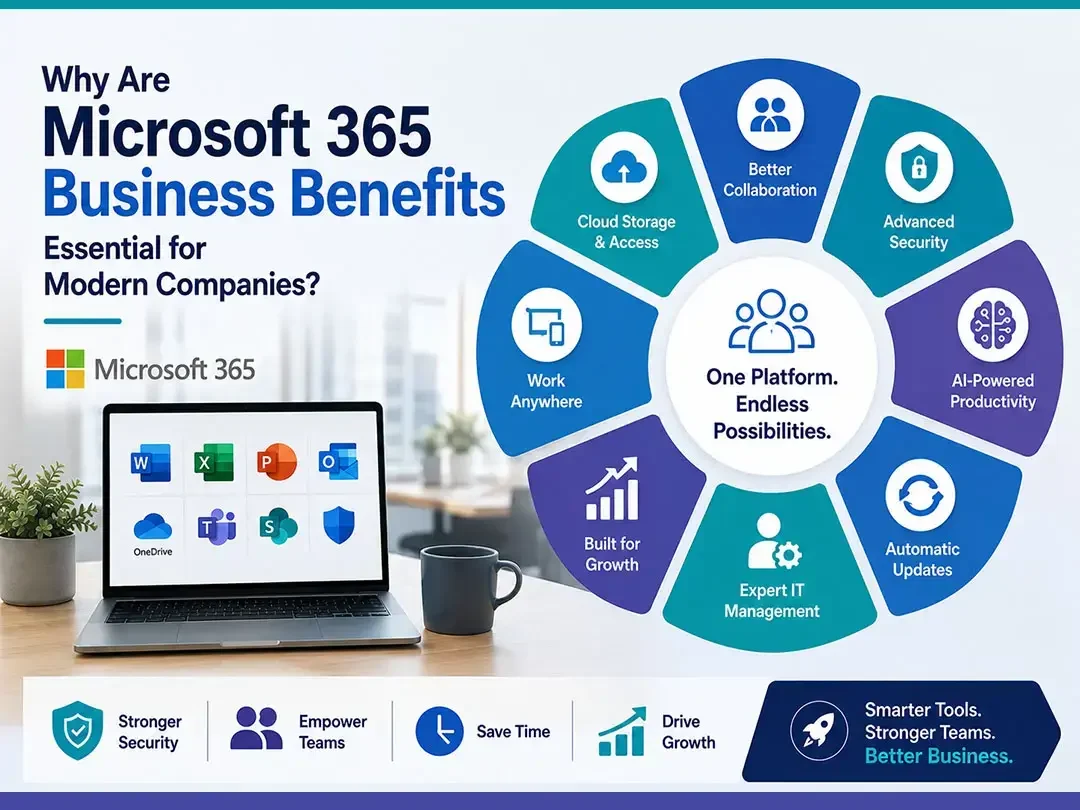
Microsoft 365 combines cloud storage, secure email, collaboration tools, identity management, device management, and artificial intelligence features into a single business platform. Employees have secure file access from almost anywhere, with consistent workflows whether in the office, remotely, or in hybrid environments.
Collaboration Has Become More Efficient
Microsoft Teams Supports Modern Communication
Effective collaboration is a priority for businesses of all sizes. Microsoft Teams adds messaging, video conferencing, file sharing, calendars, and collaborative workspaces in one application and continues to grow its functionality.
Instead of switching between different communication platforms, employees can collaborate on documents, schedule meetings, share presentations, and communicate with coworkers in real time. This combination helps to decrease confusion and increase productivity between departments.
Cloud Storage Improves Accessibility
OneDrive and SharePoint Simplify File Management
Local file storage on individual computers adds unnecessary risk and restricts collaboration. With Microsoft 365, you have safe cloud storage with OneDrive and SharePoint, so authorized users can view up-to-date documents on multiple devices without email attachments.
Automatic sync, version history, and permission controls will help reduce duplicate files and make collaboration significantly more efficient. This means employees are always working on the latest version of a document, which reduces errors related to outdated information.
Security Continues to Be a Major Advantage
Cyber risks keep evolving, and business protection is more critical than ever. Microsoft 365 offers advanced security features to help organizations defend against phishing, ransomware, credential theft, and unauthorized access.
Multi-factor authentication, Microsoft Defender, conditional access policies, email threat protection, encryption, and identity management together improve an organization’s security posture. These tools help mitigate risk and support compliance with many industry security requirements.
Artificial Intelligence Is Improving Productivity
Recent innovations have expanded Microsoft’s use of artificial intelligence across Microsoft 365. AI-powered features now help with email summaries, meeting recaps, document creation, data analysis, scheduling, and workflow automation.
These smart tools help employees do routine tasks more efficiently, freeing up more time for customer service, strategic planning, and business development. As AI capabilities change every day, businesses adapting to these technologies are finding new opportunities to improve their day-to-day operations.
Automatic Updates Reduce Maintenance
Keeping software up to date is an important part of maintaining security and performance. Microsoft 365 automatically sends feature improvements, security updates, and performance enhancements, so businesses don’t have to buy whole new versions of software.
Continuous updates enable organizations to leverage Microsoft’s ongoing investments while reducing the administrative overhead of managing legacy applications. As new features become available, businesses also get new productivity features.
Professional IT Management Maximizes Results
Creating user accounts is only the beginning of a successful Microsoft 365 implementation. Proper licensing, security configuration, data migration, device management, backup planning, and user training all help ensure successful deployment.
Businesses can partner with an experienced managed IT services provider to configure Microsoft 365 to meet their operational needs and minimize disruptions during the implementation process. Ongoing monitoring, technical support, and security management also help organizations maximize their technology investment.
Microsoft 365 Supports Future Business Growth
As organizations grow, their needs for technology continue to change. Microsoft 365 allows you to add users, increase storage, deploy additional security features, and integrate new business applications without replacing existing infrastructure.
Scalable cloud services allow businesses to more easily adapt as staffing levels, operational demands, and technology needs change. The flexibility of Microsoft 365 is an excellent platform for organizations that want to plan for future growth while keeping business operations secure and efficient.
Frequently Asked Questions
What are the biggest Microsoft 365 business benefits?
Microsoft 365 improves collaboration, strengthens cybersecurity, supports remote work, provides cloud storage, and combines productivity applications into one integrated platform.
Is Microsoft 365 secure for business use?
Yes. Microsoft 365 includes advanced security features such as multi-factor authentication, email protection, encryption, identity management, and threat detection to help protect business data.
Can Microsoft 365 support remote employees?
Yes. Employees can securely access files, email, applications, and collaboration tools from approved devices while working from virtually any location.
Why should businesses use a managed IT provider for Microsoft 365?
A managed IT provider helps configure security settings, migrate data, manage licenses, provide technical support, monitor systems, and maintain a secure Microsoft 365 environment.
If your business is ready to improve collaboration, strengthen cybersecurity, and modernize daily operations, we are here to help. Our experienced team proudly supports organizations throughout Clearwater, FL, with Microsoft 365 implementation, managed IT services, cloud solutions, and ongoing technical support tailored to your business goals. Contact us today to learn how we can help your organization work more efficiently and securely.